For brokerages and teams
Your agents get an assistant.
You get the whole floor in one view.
Every agent gets their own AI assistant. You get one roll-up across the office: every agent’s live pipeline, every conversation in full, and routing for the leads that arrive addressed to the office rather than to one agent.
The AI is not on for new accounts yet. Until it is, the chat takes a name and number for you.
What an agent gets on their own seat
6 seats and up is $199 a seat — $1,194 a month for 6, or $11,940 paid yearly, with the first 30 days free. Or call or text me directly: (858) 330-4320.
The questions you're going to ask first
Who owns the leads?
The brokerage does, on any seat the brokerage pays for. The owner downloads every lead and full transcript in one file, including after you cancel.
Exit terms, and a seat an agent buys themselves
You are the account holder and your agents are users on it, and every lead and full transcript lands in your dashboard as it happens. An agent who buys their own seat owns their own file, and the agent side of this site says it exactly that way rather than telling them something different.
There is no exit fee. The owner downloads the whole office from the export page, while the account is open and after it closes.
What can my agents see?
Only their own, unless you grant more: a team lead sees their team, and anyone you allow sees the whole office. Isolation is enforced at the database level, not by hiding a menu, and the roll-up across all of them is the broker’s view.
What happens when an agent leaves?
You reassign their leads to whoever picks up the desk, from the broker view. The conversation history moves with the lead.
Does this replace the CRM we already pay for?
Yes, when your office is ready. Keep Follow Up Boss while you switch.
Bring your Follow Up Boss export over with the office import. Bringing its notes and history over directly is coming.
While you run both: what crosses, and what stays here
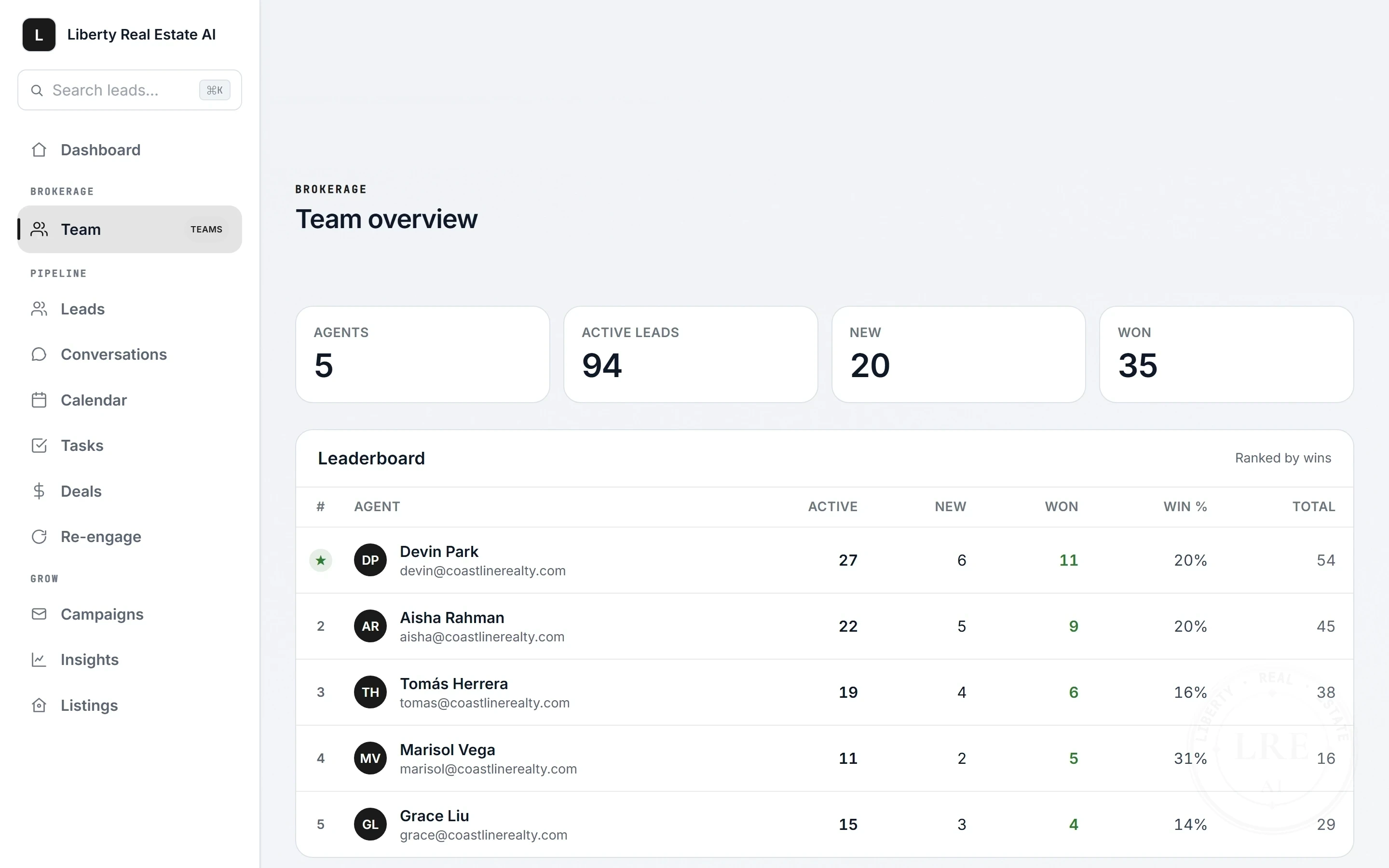
One roll-up across every agent
- Every agent’s live pipeline at a glance, ranked
- Drill into any agent’s leads and conversations
- Reassign a lead when someone leaves the desk
- @mention a teammate in a note on a lead
- Complete transcript of every conversation, exportable
- Agents never see each other’s leads
This is not a mockup. Open the live broker view and open Marisol’s desk. The other four rows are sample figures.
Every agent's pipeline, in one place.
In the product today
- Office import, one book per agent
- Round robin or first to claim
- A switched-off agent stops getting leads
- One STOP stops the whole office
- No-spam guard on every text and email
- Teams inside the office
- Office scoreboard
- Company dollar, estimated from deal sheets
- Every follow-up kept as sent
- An office library of plans and templates
Office leads get routed, not lost in a group text

Leads that arrive addressed to the office — a forwarded portal alert, the lead API, an open-house sign-in, one typed in at the front desk — get routed to a named desk, not a group text. Round robin, or first to claim.
- Round robin or first to claim, switched from the team page
- You choose which agents are in the rotation
- A claim pool on each agent’s home screen
- An In-rotation marker on the roster, next to each seat
- An office activity feed, so you watch leads land and move
- Chat leads stay with the agent whose assistant captured them
How each mode works, and what routing never touches
Some leads belong to one agent from the first word. A visitor who writes to an agent’s assistant on their own site is that agent’s lead, and routing never touches those. Other leads arrive addressed to the office itself: a Zillow or realtor.com alert forwarded from the office inbox, a lead posted in through the lead API or Zapier, an open-house sign-in, or one the front desk types in by hand. In most offices those go out as a group text and land with whoever answered first, or with nobody. Here they route.
You pick one of two modes from the team dashboard. Round robin hands each new office lead to the next agent in the rotation, evenly, with no favourites to defend. First to claim pushes it to every agent in the rotation at once, and the first one to tap it gets it. Either way the lead ends up on one desk with one name on it, not in a shared inbox nobody owns, and the conversation history travels with it from there.
The scope, plainly: routing covers what arrives at the office’s front door. It does not reroute a lead captured by one agent’s own assistant, because a buyer who wrote to a named agent has already chosen. If you want that behaviour changed, tell me on the scoping call and I will tell you honestly whether I would build it.
Published per seat, bought when you are ready
Team is $239 a seat at 2 seats or more, so $478 to start. At 6 seats and up it becomes Brokerage at $199 a seat, so $1,194 a month for 6. You pick the seat count at checkout like every other plan, and the first 30 days are free.
You add each agent from the Team page with a name and an email. Each one gets an email to set their own password.
No plan charges you by how many people write back. Listings are counted per agent, not per office: every agent on your roster can load up to 500 of their own.
Month to month, or by the year if you choose it, like everything else here. No multi-year agreement, no per-closing fee, and no percentage of a commission. The full breakdown is on the pricing page.
What 6 seats cost for a year, and hold in listings
6 seats at $199 is $1,194 a month, so $14,328 a year month to month, or $11,940 for the year paid yearly, 12 months for the price of 10. Your heaviest producer and your quietest agent cost the same every month. An agent buying on their own is $299 a month for one seat.
Across an office of 6 seats, 500 listings each is 3,000 listings, and it goes up with every seat you add. 500 is a real ceiling and it is enforced per seat, but no plan buys one agent more room than another, and no plan charges you by how many you load.
6 is a floor, not a starting point: an office that drops to 5 seats is still billed for 6, because 6 is what the $199 rate is priced against.
What happens when someone joins or quits on the 14th
Adding an agent bills the seat first and creates the account second. If billing does not take, there is no account, because the one thing that must never happen is a live assistant nobody is paying for. The seat count on your subscription goes up that day and the rest of the current billing period is prorated onto your next invoice.
Switching a seat off is the same in reverse. Their assistant stops answering and their access is gone the moment you press it, the seat count comes down, and the part of the billing period you did not use comes back as a credit on the next invoice rather than a refund. Their leads and transcripts stay in your account, and you reassign them to whoever picks up the desk.
6 is a floor, not a starting point. An office that drops from 6 seats to 5 is still billed for 6, because 6 is what the $199 rate is priced against. Going properly below 6 means moving to Team, and that is the one seat change that is not a button: changing the plan on a multi-seat subscription changes what every seat costs, so the software refuses to do it quietly and tells you to call me. I move it for you.
Built to be audited, not trusted blindly
The assistant is instructed to refuse steering questions and the proxies for them, and to keep helping with the lawful searches people actually have, like a 55+ community or a step-free home. Those are instructions to a model: they reduce the risk and they do not eliminate it.
What it refuses, and what it still helps with
It identifies itself as an AI assistant when asked, and is labelled as one in the widget. It answers listing questions only from inventory your agent loaded, and there is no MLS or IDX feed in this product by design.
How licensee identification works, and its limits
No AI is zero-error and I will not claim otherwise. That is why every word is transcripted and exportable: you can read exactly what was said to any consumer, any time. These are controls, not a transfer of liability — you are the supervising broker, and compliance is ultimately your responsibility.
Open the live demo to see the broker view and the transcripts it keeps. Fair housing, texting consent, data handling, subprocessors and cancellation are covered in full on Trust & Compliance, written to be forwarded to a compliance officer.
A pilot desk first, never the whole floor
We scope your office
A call on headcount, your MLS, and your system of record.
A pilot desk goes first
Volunteers first, never the whole floor.
You read the transcripts
Read what it said before the floor sees it.
Roll out the floor
Add seats as agents opt in.
What each of the four steps involves
1. We scope your office. A call to cover headcount, how leads reach your agents today, what your MLS allows, and what your system of record is. You get a written proposal off that call, against the published $199 a seat at 6 seats or more. You do not have to wait for it to start: checkout is open and you pick the seat count there.
2. A pilot desk goes first. We start with a handful of agents who volunteer, not the whole floor. Their assistants go live on their sites, listing links, and open-house QR codes, and you get the roll-up view from day one.
3. You read the transcripts. Every conversation is complete and exportable. Before this touches the rest of your agents, you read what it actually said to real consumers and decide whether it represents your brand.
4. Roll out the floor. Add seats as agents opt in. Each one is set up with their own name, market, and voice. Nothing about your website, domain, MLS, or CRM depends on us continuing to exist.
What you'd be signing up for
Liberty Real Estate AI is built and run by one person, Xavier Liberty, in Escondido, California. The brokerage roll-up is shipped and running, and the first office deployments are being scoped now. If that is you, you are early, and you should price that in.
What being early buys you, and what it does not
What being early buys you: the person who writes the software takes your calls, and the product gets shaped around how your office actually works rather than around a roadmap written for someone else.
What it does not buy you is a reference list I do not have. I would rather tell you that than point at a logo wall. The continuity question a one-person vendor deserves, what happens to your data if I am hit by a bus, is answered plainly under “If Something Happens To Me”, and the changelog shows whether this is actually being maintained.
Bring me the hardest question your compliance officer has.
A scoping call is thirty minutes. Bring your operations lead, your compliance officer, and the objection you think kills it. If the answer is no, you get a straight no rather than a follow-up sequence.
Or email support@libertyrealestateai.com.