AI assistant · CRM · Copilot
The whole street is asleep. Your assistant isn’t.
More about what it does
The whole street is asleep. Your office isn’t.
More about what it does
$299/mo · first 30 days free
one seat · no setup fee · cancel in two clicks
$199/seat at six seats or more
$239/seat at two · $199 at six · no setup fee · cancel in two clicks
The AI is not on for new accounts yet. Until it is, the chat takes a name and number for you.
An illustrative conversation on your website at 11:32 PM on a Friday. Visitor: Hi, is the Granada Ave house still available? Assistant: Saturday 10am or Sunday 2pm are open with Xavier. Which works? And what’s the best number to confirm? Visitor: Saturday · (619) 555-0148 Assistant: Saturday at 10am is on Xavier’s calendar. He confirms access with the listing office and texts you directly. By 11:39 PM the lead is booked, with Saturday 10:00 AM held on your calendar awaiting your OK.
Illustrative conversation · the real one, Marisol, is awake now
Works on any website with one line of code
The morning after, in three receipts
Buyers browse at night, and they leave their number with whoever answers first.

Liberty · Overnight record
Captured
A visitor asks about one of your listings. Your assistant answers in your style.
Why it answers at that hour
Liberty · Overnight record
Qualified
It answers their questions, learns their budget and timeline, and gets their contact details.
What it asks, and what it keeps
Liberty · Overnight record
Booked
It offers a time and holds it on your calendar for you to confirm. Getting into the house is still your call, with the listing office.
What is waiting in the morning
Illustrative, and timed to match the conversation above.
See what a visitor gets today.
The AI is off in this demo today. Marisol takes a name and number, the way a new account does.
What Marisol is
The dashboard you wake up to.
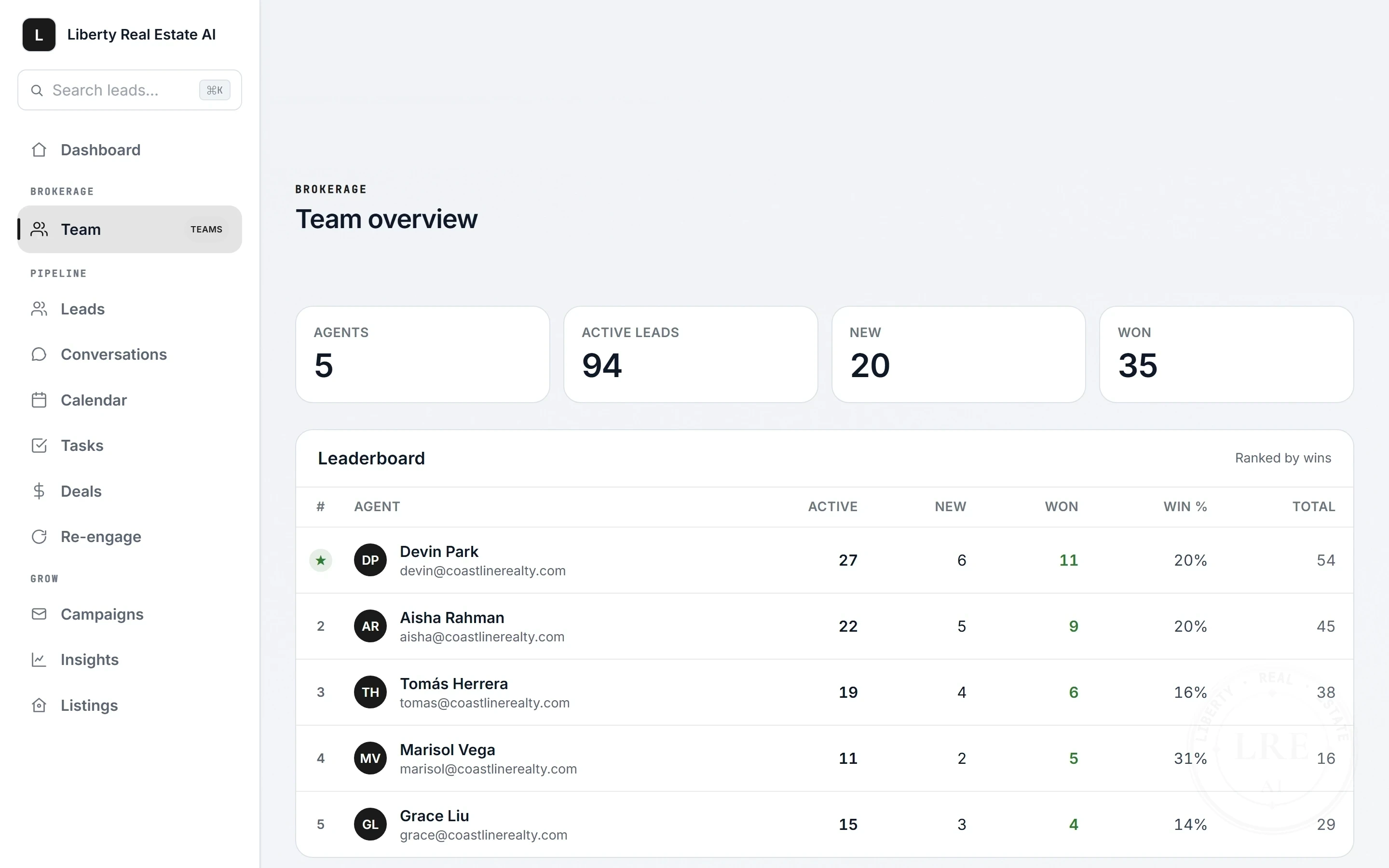
The whole office, one screen.
The rest of your side of it.
The screen above is what you open in the morning. Here is the rest of what you work in.
Both rooms ship. Press one.
It already knows which lead you have open.
Ask for a message and you get a draft with a Send button under it. Press it or leave it. Nothing goes out until you do.
What it knows before you ask
It drafts and proposes. Nothing sends or changes without your confirm.
One screen for both your AIs.
Name your assistant, give it pronouns and a picture — it is the one your leads talk to. Then pick a window and see how much each of the two did in it. There is no list of running jobs, because the copilot only works while you are waiting on it.
What the counts are, and are not
The front desk, the filing cabinet, and the second pair of eyes.
Your assistant answers and holds the time. The CRM keeps your book of business. Copilot sits inside it and works next to you. One login, one bill.
The assistant
It answers every visitor on your site, in their language, and holds a time on your real calendar for you to confirm.
More about assistant
The CRM
Every lead on one record, live: the chat, the texts, the emails, the bookings, the notes.
More about CRM
Copilot
An AI inside the CRM itself, reading your pipeline. Nothing sends on its own.
More about Copilot
Every plan is the same complete product, with every feature.
What the plans actually differ on
Built around your listings, not from a template.
Built around your office, not from a template.
It answers from your listings and your market, and introduces itself with your name and your brokerage.
You give it a name, pick its pronouns and put a picture on it, and that is who your leads meet. Ask it whether it is a person and it says it is an AI. That one is not a setting.
What else you can change
Most of the category ships one assistant to everybody and lets you change the colour of the bubble.

You get Xavier, not a ticket queue
Escondido, California
I built Liberty Real Estate AI and I run it myself. Ask a question at 4pm on a Tuesday and you are talking to the person who wrote it.
- Built
- Per agent, on your listings
- Support
- The person who wrote it
- Direct line
- (858) 330-4320
One bill for the whole stack. Never priced by the lead.
A CRM, an AI lead responder and four more, on one line. You are billed by the seat — never by the lead, the conversation or the message.
What the one bill replaces
Nothing is ever dropped, and a busy month never costs more than a quiet one.
- The assistant, the CRM and Copilot are included, with every feature on every plan.
- Listings work the same on every plan, up to 500 for each agent.
- One-click CSV export of your leads and your transcripts.
- Switching is an afternoon, not a project: import your whole book from a CSV.
The other three ways leads arrive
Forward your Zillow or realtor.com lead alerts to a private address, and connect the rest through the lead API or Zapier. Each alert lands as a lead; a clear one starts your automated follow-up and an unclear one waits for you. - The dashboard installs on your phone as an app. Unread badges sit on the icon, and a new lead arrives as a push with a Call button on it.
- One seat is $299 a month. A second is $239 on Team, which is less than the first, and the whole product either way.
Solo
one seat
$299/month
First 30 days free
Start 30 days freeNo setup fee · cancel in two clicks
Card at signup · $0 today · first charge day 31
Or by the year: 12 months for the price of 10
Free for 30 days, then one month at my risk
After that, if your first paid month is not right, email or text me within 30 days of that charge and I will refund it in full.
What happens during the free 30 days
Per seat, and it drops as you grow.
Your heaviest producer and your quietest agent cost exactly the same, every month. No plan charges you by how many people write back.
You are billed by the seat and by nothing else: not by the lead, the conversation, the message or the minute. Add and remove seats as the roster changes, and the per-seat rate drops as it grows.
- The assistant, the CRM and Copilot on every seat, with every feature.
- One roll-up across the office: drill into any agent’s leads.
What else the roll-up does
Reassign when someone leaves, and @mention your team on a record. - Agents never see each other’s leads.
- Office lead routing: round robin, or first to claim from a pool.
Which leads route, and what you see
The pool sits on each agent’s own home screen. It covers leads arriving by forwarded portal email, the lead API, open-house sign-ins, or entered by hand, with an office activity feed and a view of who is in rotation. - Export any agent’s full transcripts to CSV from the roll-up, and your own leads any time.
Per seat, per month
$239
2 to 5 seats
$199
6 or more seats
Every seat, the whole product
Book a callOr start it on a card at checkout, where you pick your seat count. Same price.
No setup fee · cancel in two clicks
Or by the year: 12 months for the price of 10
The four I get every time.
What brokers ask me first.
“I already have an ISA.”
Keep them. This covers what they can’t: 9pm on a Saturday, the buyer who writes in Spanish, and the first sixty seconds. Then it hands your ISA a qualified lead, with the full transcript waiting in the dashboard.
“I don’t want a bot embarrassing me in front of my sphere.”
Objective facts about homes and the market only. It is instructed to refuse steering questions and the proxies for them, while still helping with lawful searches like 55+ communities and step-free homes. Guardrails reduce risk, they are not a guarantee, and every word is transcripted so you can check.
“My business is referrals, not my website.”
Then point it somewhere else: listing links, open-house QR code, past contacts already in your database. Forward your Zillow or realtor.com lead alerts to your private Liberty address and each one lands as a lead. Your website is one door of several.
“How many agents are using this?”
Few enough that I’d rather give you the real number on a call than dress it up here. This is new, and I am not going to invent testimonials or paste brokerage logos to hide that. Check it yourself instead: the product is built and running, and you can open the live demo and the dashboard it fills. Being early is the trade: you get me personally.
“What happens when an agent leaves?”
Reassign their leads same day from the roll-up; conversations, notes, and bookings stay on the record. The office owns the file, not the agent.
“I’m not putting a bot in front of my sphere.”
Objective facts about homes and the market only. It is instructed to refuse steering questions and the proxies for them, while still helping with lawful searches like 55+ communities and step-free homes. Guardrails reduce risk, they are not a guarantee, and every word is transcripted and exportable so you and your agents can check.
“We already give every agent a CRM.”
Keep Follow Up Boss while you switch. Bring your Follow Up Boss export over with the office import, and replace it when your office is ready.
“Half my agents won’t touch new software.”
They don’t have to. It runs on the doors they already use, and the lead shows up where they already look. The dashboard installs on their phone as an app, unread counts sit on the icon, and a new lead arrives as a push with a Call button, so the ones who never open a laptop still answer first.
“How long does rollout take?”
Each agent’s own setup is one three-step form that takes about ten minutes, and their assistant is live the moment they finish. Nothing waits on an MLS integration: listings are typed in, or read from a public listings URL or your CSV where the AI is switched on. The agent approves them before the assistant can use them. You add each agent from the Team page with a name and an email. Each one gets an email to set their own password.
Still deciding? Read the trust page, or the full price list.

Tonight, the street goes dark again.
Tonight, every phone in the office goes dark.
Whoever answers first gets the appointment. The only question is whose window stays lit.
What comes in after hours
$299/mo · first 30 days free · no setup fee · cancel in two clicks
$239/seat at two · $199 at six · no setup fee · cancel in two clicks
Prefer to talk? Call or text (858) 330-4320